
If you’ve ever wondered if it’s now legal to store your driver’s license on your smartphone, the short answer is yes — the Land Transportation Office (LTO) now officially recognizes the Electronic Driver’s License (eDL) as a valid and secure alternative to the physical card license.
Sure, it’s convenient, secure, and officially recognized, giving drivers a modern, paperless way to stay compliant with regulations, but before you ditch your plastic card completely, there are important details you need to know about how the eDL works and how to legally use it when driving.
What is an Electronic Driver’s License (eDL)?
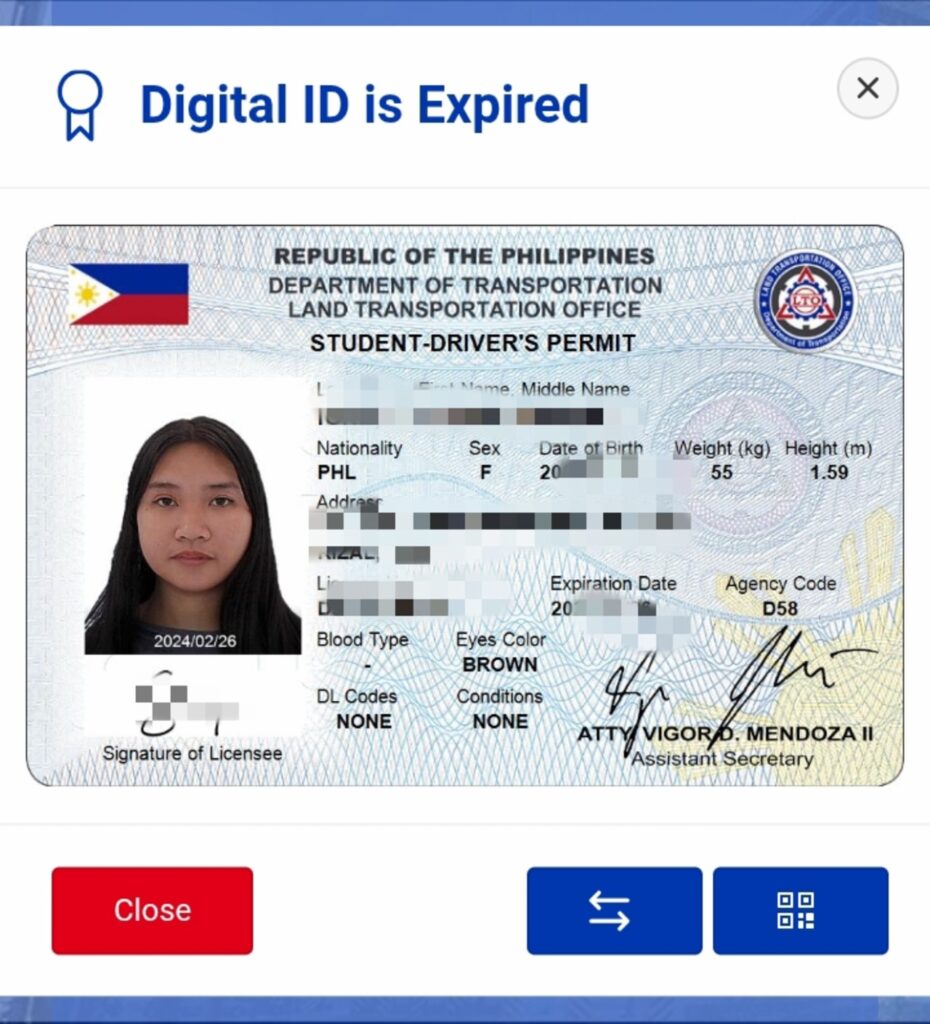
The Electronic Driver’s License (eDL) is the digital version of your LTO-issued driver’s license, accessible through your LTMS (Land Transportation Management System) portal account. It contains the same information as your physical card — your name, photo, license number, and restrictions — but stored securely in digital format.
You can view, store, and present it using your smartphone, tablet, or another authorized electronic device.
Is it Legal to Store Your License on your Smartphone?
Yes. The eDL is a legally recognized form of identification and authorization to drive under LTO’s new policy framework. It holds the same privileges and responsibilities as a physical license. This means:
- You can present your eDL to law enforcement officers during apprehension.
- It is accepted as valid proof of authority to operate a motor vehicle.
- Traffic rules, fines, and penalties that apply to physical licenses also apply to eDLs.
However, there are strict rules on how you present your eDL — and this is where most drivers make mistakes.
What’s Not Allowed
You cannot just take a screenshot or photo of your eDL and show it to an officer. Screenshots and photos are not recognized by the LTO as valid proof of license.
To be accepted:
- The eDL must be accessed live from your LTMS Portal (https://portal.lto.gov.ph).
- It must display the QR code, photo, and biometric verification in real time.
- The officer can verify it by scanning the QR or barcode using their handheld device.
If you fail or refuse to show your eDL through the LTMS portal, it is treated as a violation for “failure to carry a driver’s license.”
Security and Verification Features
The LTO uses multiple digital safeguards to protect and verify the authenticity of each eDL, including:
- QR code scanning
- Digital signatures
- Biometric data (photo and fingerprints)
- Encryption and verification systems
These features prevent falsification and make it easy for officers to confirm that your eDL is genuine.
How to Get an eDL
If you already have an active driver’s license, you can access your eDL through your LTMS Portal account. The LTO is gradually rolling out this feature nationwide, and all qualified drivers will soon have access.
To view your eDL, simply follow these steps:
Step 1. Go to the official LTO LTMS Portal: https://portal.lto.gov.ph
Step 2. Log in using your account credentials.
Step 3. Navigate to your Driver’s License section.
Step 4. View your Electronic Driver’s License (eDL) — it should display your license details and QR code.
If you’re applying for a new or renewed license, you’ll automatically become eligible to access your eDL once it’s processed and activated by LTO.
How to Present your eDL During Inspection or Apprehension
If you’re stopped by an LTO officer or a deputized agent:
Step 1. Open your LTMS Portal on your smartphone or tablet.
Step 2. Go to your Driver’s License section to show your live eDL.
Step 3. The officer will scan your QR code or barcode using their verification device.
Step 4. Your eDL will be validated instantly.
If you’re offline or can’t access your LTMS account, you must present your physical license instead.
What Happens if You Don’t Show Your eDL Properly
According to LTO rules:
- Failure or refusal to show your eDL from the LTMS portal translates to “Failure to carry driver’s license” violation
- Officers must record in the Temporary Operator’s Permit (TOP) whether you presented an eDL or physical license.
So, even if your eDL exists in your account, you must access it properly to avoid penalties. Remember: Screenshots don’t count, so proper access is key to staying on the right side of the law.