
NCAP fake links and NCAP online scams are fraudulent schemes that pretend to be official violation notices from the Metro Manila Development Authority (MMDA). These scams trick drivers into clicking harmful URLs, sharing private details, or paying false penalties. Criminals often send text or email messages that look real and even use the same sender name as government agencies to appear like real NCAP violation notices, making them look convincing enough to put your privacy and money at risk.
Understanding how these scams work and knowing how to report these fake NCAP links helps you protect yourself from losing money and stop scammers from targeting more people. This guide explains where to file complaints about fake NCAP links, how to recognize fraudulent notifications, and what to do if you receive one, all so you can respond quickly, safeguard your information, and share accurate advice with others.
How Do NCAP Notifications Look Like?
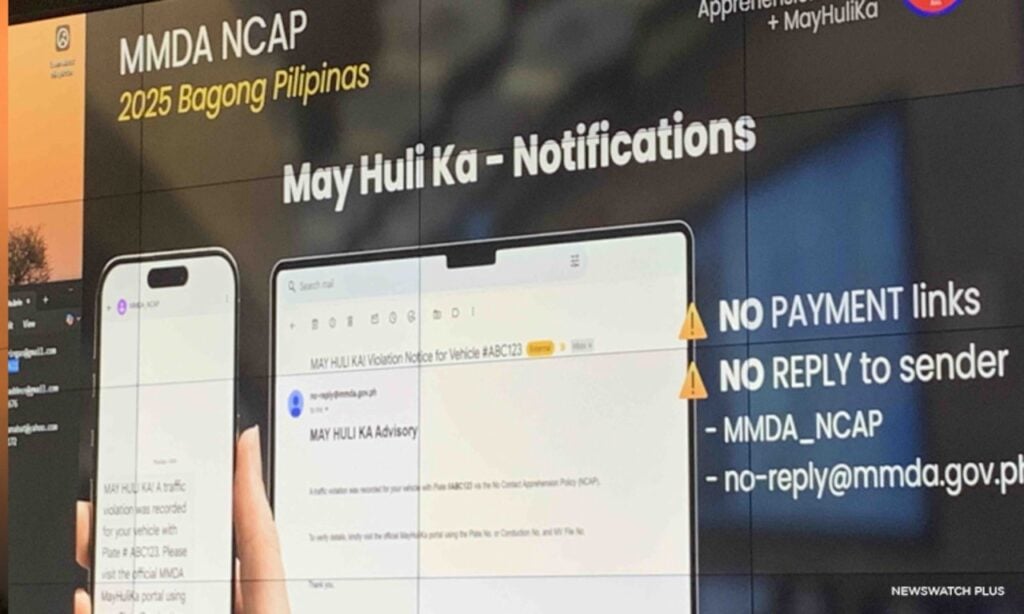
Here are the key features of official NCAP notifications you should check before taking any action:
- Official MMDA Sender Name or Email: Texts or emails come from MMDA-approved channels, not random mobile numbers.
- Complete Violation Details: Includes your plate number, date, time, location, and type of traffic violation.
- Unique Notice Number: Each notice carries a specific case or reference number for tracking.
- No Clickable Payment Links: Official messages do not ask you to click a link for payment or personal information.
- Direct Website Reference: Points only to the verified NCAP portal https://mayhulika.mmda.gov.ph/ for checking violations.
- Professional Formatting: Uses proper grammar, clear layout, and MMDA logos without spelling errors or odd characters.
- Payment Instructions Through Authorized Channels: Advises payment via MMDA-accredited banks or official counters, never through personal accounts.
How to Spot Fake NCAP Notifications
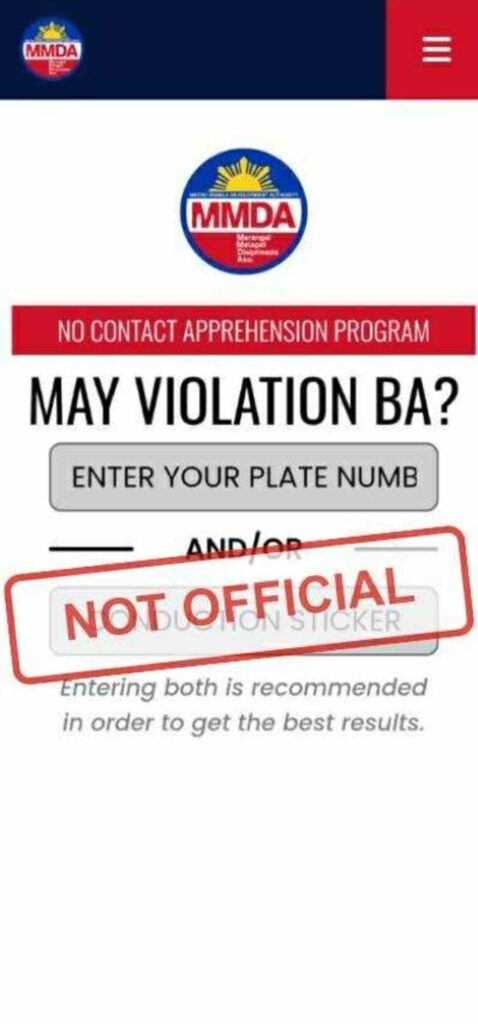
Scammers often send messages that look like real NCAP violation notices, but they have telltale signs.
- Look for poor grammar, odd spelling, or links that do not match the official MMDA website.
- Be cautious of messages that demand quick payment or threaten legal action to pressure you.
- Always verify the source before clicking any link.
- Real NCAP violation notices can also be checked at the official MMDA portal: https://mayhulika.mmda.gov.ph/.
- Avoid using any other site or link sent through text or email.
- Verify the sender: Scammers can mimic the “MMDA” sender name, so treat every message with caution.
- Cross-check with MMDA: If in doubt, visit the official website directly or call the MMDA hotline instead of clicking the message link.
Who Needs to Know About This
This information is useful for anyone who might receive or encounter NCAP-related messages online. It is particularly useful to:
- Vehicle Owners and Drivers: Anyone who drives or owns a vehicle in Metro Manila and receives NCAP violation notices may encounter fake links or scam messages.
- MMDA Commuters: Regular users of roads and public transport can also be targeted by fraudulent NCAP notifications.
- Parents and Guardians: Those managing vehicles for family members need to know how to verify real NCAP violations.
- Employees Handling Fleet Vehicles: Companies with multiple vehicles should train staff to recognize and report fake NCAP links.
- General Internet Users: Even if you don’t drive, being aware of scams helps protect your personal data from fraudsters.
Requirements for Filing Complaints Regarding Fake NCAP Notifications
When reporting fake NCAP links or scam messages, you will need the following to speed up the investigation by the I-ARC, CICC, NPC, or PNP ACG and help prevent further scams.
- Copy of the Suspicious Message or Link: Screenshot or save the text, email, or URL that you received. This helps authorities trace the source.
- Sender Details: Note the phone number, email address, or sender name that the scammer used, even if it looks like it comes from MMDA.
- Date and Time of Receipt: Record when you received the message or link. This assists in tracking the incident timeline.
- Your Contact Information: Provide your name, phone number, and email so authorities can follow up if needed.
- Any Action Taken: Mention if you clicked the link, entered information, or ignored the message. This helps authorities assess potential risks.
- Device Information (Optional): If relevant, include the device type (mobile, PC, tablet) and operating system where you received the message.
How to Handle Fake NCAP Links or Scam Messages
If you receive a fake NCAP link or scam message, here’s what you need to do to protect your personal information and reduce the spread of NCAP-related scams.
Step 1. Do Not Click the Link
Avoid interacting with any suspicious NCAP link. Do not enter personal information or make any payments.
Step 2. Report to Hotline 1326 (I-ARC)
Call the Inter-Agency Response Center (I-ARC) Hotline 1326 to report the scam. This centralized service handles complaints related to online scams and NCAP fraud.
Step 3. Report to CICC
Visit the Cybercrime Investigation and Coordinating Center (CICC) website at cicc.gov.ph to submit details about the suspicious link or message.
Step 4. Notify the National Privacy Commission (NPC)
If your data may have been compromised, send a complaint to complaints@privacy.gov.ph or use the NPC portal at privacy.gov.ph.
Step 5. Contact the PNP Anti-Cybercrime Group (ACG)
Report the scam to the PNP ACG hotline (02) 8723-0401 or email acg@pnp.gov.ph for investigation.
Step 6. Report Suspicious URLs to Google
Use Google’s Safe Browsing Report Form at safebrowsing.google.com/safebrowsing/report_phish/ to block malicious sites.
Step 7. Verify Through Official Channels
Always check NCAP violations on the official MMDA website: https://mayhulika.mmda.gov.ph/ and confirm any notices directly with the MMDA hotline.
Step 8. Alert Others
Inform friends, family, or colleagues about the scam to prevent them from falling victim.
Where to File Complaints for Fake NCAP Links
If you receive a fake NCAP link or scam message, immediately report it to the Inter-Agency Response Center (I-ARC) by calling Hotline 1326. This hotline is a joint effort of the DICT, CICC, NPC, and NTC to handle online scam reports. You can also visit the Cybercrime Investigation and Coordinating Center (CICC) website at cicc.gov.ph to submit details about the suspicious link.
For cases where your data might have been exposed, contact the National Privacy Commission (NPC) by emailing complaints@privacy.gov.ph or use their online complaint form at privacy.gov.ph. Additionally, report the scam to the Philippine National Police Anti-Cybercrime Group (PNP ACG) through their hotline (02) 8723-0401 or email acg@pnp.gov.ph for investigation and follow-up.
Reporting Fake Links to Google
Aside from government channels, you can help stop scams by reporting fake NCAP links to Google. Use the Safe Browsing Report Form at safebrowsing.google.com/safebrowsing/report_phish/ and provide the suspicious URL. This helps Google block malicious sites and protect other users from the same threat.
How Scammers Use the Same Sender Number
Fraudsters can make their messages appear as if they come from the same sender number as official agencies. This trick, known as SMS spoofing, allows fake texts to appear alongside real messages in the same thread. Because of this, even texts that seem to come from “MMDA” or a trusted government contact might be fraudulent.
To protect yourself, do not click any links inside suspicious texts, even if they seem to come from a familiar sender name. Instead, verify the notice by visiting the official MMDA website directly or calling their hotline for confirmation.
Staying Updated with Official NCAP Details
Only trust the official MMDA website for NCAP violation information: https://mayhulika.mmda.gov.ph/. Bookmark this site and avoid checking violations through links sent via text or email. Keeping this website as your main reference prevents you from accidentally visiting scam pages.
Video: MMDA Warns Against Fake NCAP Notifications
Learn how to guard against fake NCAP links by watching a step-by-step video guide on reporting scams and spotting fraudulent messages. The video explains where to file complaints, how to use Google’s Safe Browsing form, and how to confirm genuine NCAP notices. Share it with family and friends so they know how to protect themselves from NCAP-related scams.