LTO Tracker: How to Track Your Driver’s License and Plate Number Online

The LTO Tracker is an online platform jointly developed by the Land Transportation Office (LTO) and the Department of Transportation (DOTr) that allows motorists in the Philippines to check the availability and delivery status of their driver’s license and vehicle plate number in real-time without the hassle of repeated LTO trips.

If you’ve been waiting for your driver’s license or vehicle plate number and don’t want to keep making trips to the LTO just to check, the LTO Tracker now offers a convenient, transparent, and secure way to monitor the status of your license or plate from your phone or computer — and even have it delivered right to your doorstep, allowing you to save time and avoid the stress of long queues.

What Does it Do?

The LTO Tracker is a convenient, transparent, and secure online platform that allows motorists in the Philippines to check the availability and delivery status of their driver’s license and vehicle plate number online in real-time. Through this online LTO tracker, users can:

  • Search for license and plate availability
  • Request home delivery via LTO-accredited couriers
  • Track delivery progress online

Note that despite the availability of options to deliver the license via the LTO tracker, foreign driver’s license conversions are still not eligible for delivery and must be sent through the Philippine Postal Service as per the LTO memorandum dated December 23, 2019.
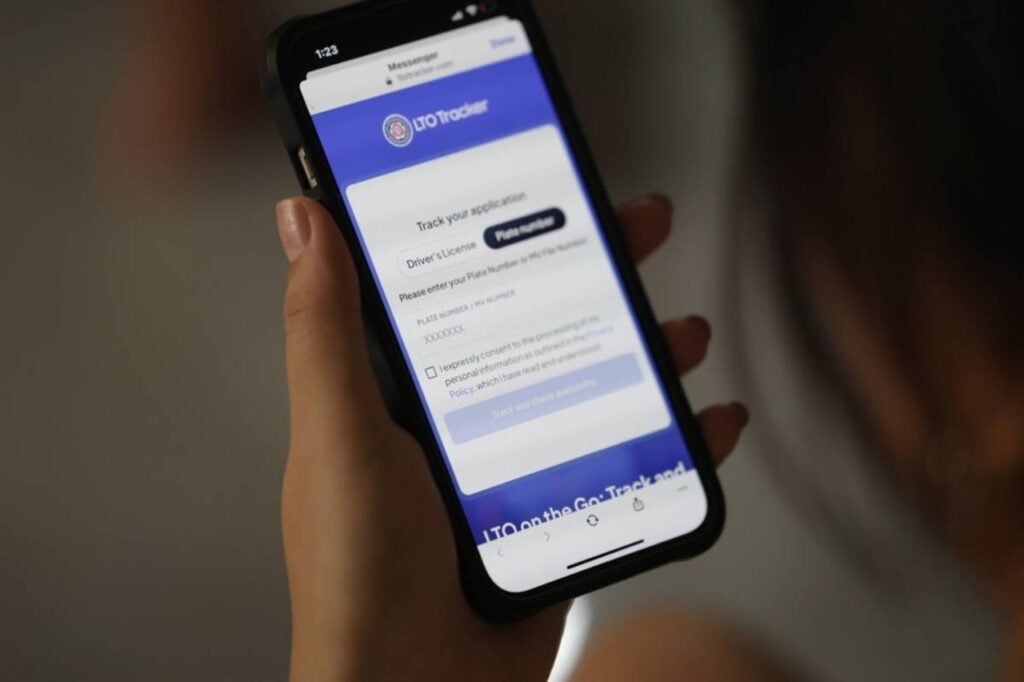
lto-tracker-app
Photo credit: LTO

What Is it For?

The online LTO tracker was created for:

  • Convenience: Check status anytime, anywhere.
  • Faster service: Reduce unnecessary trips and waiting time at LTO offices.
  • Transparency: View real-time updates on application and delivery status.
  • Accessibility: Provide an online alternative to in-person follow-ups.

Benefits of Using LTO Tracker

With the No Plate, No Travel policy, having quick access to plate status is a big help. The tracker:

  • Saves time by avoiding unnecessary LTO visits
  • Helps avoid fines by knowing exactly when your plate is ready
  • Lets you opt for home delivery, similar to passport or PSA document drop-offs
  • Lets you monitor your license or plate’s progress online.
  • Allows you to have it shipped securely to your home.
  • Helps protect your personal information using advanced security systems.

Who Can Use

The LTO Tracker was created with the following users in mind: 

  • Motorists in the Philippines waiting for their driver’s license or vehicle plate number
  • Vehicle owners who recently bought a new car or motorcycle and are waiting for their plates
  • Motorists who renewed their driver’s license and need to check its availability
  • Owners requesting replacement plates or licenses due to loss, damage, or change of details
  • People who prefer home delivery of their license or plate instead of in-person pick-up
  • Those with internet access who want to track updates online

Note: This is not for foreign driver’s license conversions — these are delivered only via the Philippine Postal Service as per LTO policy

Requirements

Here’s what you need to prepare to use the LTO Tracker without any hassle:

  • For Driver’s License tracking:
    • Driver’s license number
    • Birthdate
    • LTMS client number (if your record isn’t found)
  • For License Plate tracking:
    • Plate number or 15-digit MV (Motor Vehicle) file number from your Certificate of Registration (CR)
    • Additional details if not found in the system: name, birthdate, OR/CR details, email, phone number, and LTO transaction location
  • For Delivery Requests:
    • Clear photo of a valid government-issued ID
    • Copy of OR (Official Receipt) and CR (Certificate of Registration) for the vehicle
    • Complete delivery address
    • Payment for courier fee via GCash or QRPh

How to Use the LTO Tracker

To use the tracker, simply follow these steps:

Step 1. Go to the official website

Visit https://ltotracker.com. Only use the official site.

Step 2. Choose the service

Select either Driver’s License or License Plate.

Step 3. Enter your details

  • For license: Input your license number and birthdate.
  • For plates: Enter your plate number or the 15-digit MV file number from your Certificate of Registration (CR).

Step 4. Check the status

Results may show: In Process, Dispatched, Ready for Pick-Up, or Available for Delivery.

Step 5. Select pick-up or delivery

  • For delivery: Upload a photo of your valid ID and OR/CR, provide your address.
  • Pay the delivery fee via GCash or QRPh. Rates vary by location.

Step 6. Track delivery progress

Once booked, you can follow the status until it arrives.

Fees

Here are the fees associated with using LTO Tracker:

  • Delivery fee varies by location — If you opt for home delivery of your driver’s license or plate number, you’ll pay a courier fee that changes depending on where you are in the Philippines.
  • Payment via e-wallet — You can settle this delivery fee using GCash or QRPh.
  • Examples from user experience:
    • One user reported a delivery fee of ₱158.49 for plate delivery within Quezon City. 
    • Another user located outside Metro Manila shared having paid ₱240 for shipping their license to Cebu City.
    • A separate user mentioned paying ₱159 for delivery via GogoExpress. 

Reminders

When using LTO Tracker, make sure that you are ready to:

  • Provide accurate and complete personal details
    • Name
    • Address
    • Contact details
  • Use the platform only for lawful purposes
  • Avoid fraudulent or harmful activities
  • Follow applicable Philippine laws and regulations

You may also want to take note of the following:

  • The LTO Tracker acts as an intermediary between users and delivery service providers.
  • Delivery time and condition are handled by the courier.
  • Any delivery disputes must be taken up directly with the courier company.
  • LTO does not guarantee complete accuracy of online data at all times.
  • LTO is not liable for content errors, delays, or damages arising from site use.
  • Service access can be terminated without notice for any reason.
  • Terms of Use may change periodically; users should check for updates.

Video: How to Use the LTO Tracker

For a visual walkthrough on how to use the LTO Tracker, you may watch this video below:

Contact Information

For inquiries and other concerns, you may reach out to LTO via the following:

  • Email: c3.ltocentral@gmail.com / digital.hub.lto@gmail.com
  • Official Contact: ltomailbox@lto.gov.ph
How to Complete an LTO Transaction When the Mother File is at Another Branch

Completing an LTO transaction while the mother file is in another branch means that your vehicle’s original records—also known as the mother file—such as the Certificate of Registration (CR) and Official Receipt (OR), are stored in the office where it was first registered. It usually happens when you buy or register a vehicle in one city but later move or handle renewals in another. While annual registration can be done anywhere, transactions like ownership transfers or duplicate requests require coordination with the original branch. This adds extra steps and waiting time, but it can still be completed at your local LTO office.

If you’ve relocated or bought a secondhand vehicle from a different province, and you are wondering if you can still complete your LTO transactions locally, or if you still always need to go back to the originating branch, then the answer is yes—you can process most transactions even if the mother file is elsewhere. This guide will explain the process of transacting with another branch so you can complete your transactions faster in the future.

What is a Mother File in the LTO?

Completing-an-LTO-transaction-with-Mother-File-in-other-branch

When a motor vehicle is first registered with the LTO, its original documents are filed at that specific branch. These records—called the mother file—include the Certificate of Registration (CR), Official Receipt (OR), and other registration details.

For example:

  • If your car was bought and first registered in Cebu City, the mother file is kept at LTO Cebu.
  • Even if you move to Manila and renew your yearly registration there, the original records will still be stored in Cebu.

This becomes important when you need to process certain LTO transactions like ownership transfers, duplicate CR requests, or other miscellaneous updates.

Can You Process LTO Transactions at a Different Branch?

Yes. Many motor vehicle (MV) miscellaneous transactions can be handled at any LTO District or Extension Office nationwide. However, if the mother file is at another branch, your local office will need to coordinate with the original branch for confirmation.

This means extra steps, additional waiting time, and sometimes fees—but it’s still possible.

Who Needs This?

This process is relevant for the following groups of people:

  • Vehicle owners who relocated: If you bought or registered your car in one city (e.g., Cebu) but now live in another (e.g., Manila), you’ll need to know how to complete transactions without going back to the original branch.
  • Secondhand vehicle buyers: If you purchased a used vehicle that was first registered in another province, the mother file will still be in that branch, and you’ll have to go through this process for ownership transfers.
  • Motorists handling ownership transfers or updates: Anyone processing a change in ownership, requesting a duplicate Certificate of Registration (CR), or other miscellaneous transactions that require access to the mother file.
  • Car dealers and agents: Those assisting clients in processing LTO transactions across different branches also need to know the steps to avoid delays.

In other words, this guide is for any motorist or buyer whose vehicle records are kept in an LTO branch different from where they now intend to process their transactions.

Requirements for Completing an LTO Transaction at Another Branch

Before heading to your preferred LTO branch, prepare the following documents:

  • Notarized Deed of Conveyance (e.g., Deed of Sale, Deed of Donation)
  • Original Official Receipt (OR) of registration
  • Original Certificate of Registration (CR)
  • Other supporting documents specific to your transaction

Important Reminder: Always bring the original OR and CR. Photocopies are usually not accepted for verification.

Step-by-Step Guide: How to Complete an LTO Transaction When the Mother File is Elsewhere

Step 1. Gather Your Documents

  • Secure the notarized Deed of Conveyance, original OR, original CR, and other required paperwork.

Step 2. Go to Your Preferred LTO Branch

  • Visit any LTO District or Extension Office that handles miscellaneous transactions (ownership transfers, duplicate requests, etc.).

Step 3. Submit and Process the Transaction

  • File your documents at the counter. The local branch will check and start processing your application.

Step 4. Send Documents for Confirmation

  • The LTO branch will forward copies of your Deed of Conveyance and OR/CR to the original branch holding the mother file.

Step 5. Wait for Confirmation

  • The originating branch will review your request and send back a confirmation document or circular.
  • This confirmation is necessary before your transaction can be finalized.

Step 6. Complete the Transaction

  • Once the confirmation is received, the local branch will finalize the process and release your updated documents.

Things to Keep in Mind

If you are transacting at another LTO branch while your mother file ia elsewhere, then here are aome things worth keeping in mind: 

  • Processing Time: Since your request involves coordination between two LTO branches, expect delays in processing. Some motorists report waiting weeks to over a month before confirmation arrives.
  • Patience is Key: Transactions involving the mother file often move slower than standard renewals so you will need to plan accordingly.

How to Transfer Your Mother File to Another Branch

If you frequently deal with the LTO in your current city, you have the option to transfer your mother file to your local branch. This way, you won’t need to wait for confirmations from the original branch every time.

Here’s how:

Step 1. Write a formal request letter to the LTO branch where your mother file is kept.

Step 2. Submit the letter and pay the transfer fee (the amount varies depending on the office).

Step 3. Wait for your documents to be physically mailed and updated at your new preferred branch.

Note: Motorists who have done this report waiting more than a month for completion, but once transferred, future transactions become smoother as there is no longer any need to confirm with the originating branch.

Frequently Asked Questions (FAQs)

For your reference, here are some common questions and answers regarding transacting with LTO branches other than the originating branch:

1. Can I renew my registration if my mother file is in another branch?

Yes. Annual registration renewals can be done at any LTO branch, regardless of where the mother file is kept.

2. How long does it take to complete a transaction if the mother file is elsewhere?

It depends. Some transactions can be processed within weeks, while others may take a month or more due to mailing and verification delays.

3. Can I request a mother file transfer online?

As of now, no online system exists for transferring mother files. You must file a formal written request at the original LTO branch.

4. What happens if I don’t transfer my mother file?

You can still process transactions at your local LTO, but each time, your branch will need to confirm details with the mother file branch—causing delays.

5. How much does it cost to transfer the mother file?

The fees vary per branch. You will pay a transfer fee plus any applicable registration or processing charges. It’s best to inquire directly with the LTO branch where you want to move your file.

Video: Can I Transfer Ownership at Any LTO Branch?

Completing an LTO transaction when the mother file is at another branch is possible, but it requires extra steps, patience, and coordination between offices. Always prepare the original OR, CR, and notarized documents, and expect some waiting time for confirmation. If you’ve permanently moved, requesting a mother file transfer is highly recommended. It might take longer initially, but it will save you from repeat delays every time you process your LTO transactions. To learn more about this, you may check out this video about transferring MV ownership at another branch other than the one with the vehicle’s mother file: 

How to Handle a Refused or Revoked License in the Philippines

Handling a refused or revoked LTO driver’s license in the Philippines means dealing with the cancellation or denial of your driving privilege due to violations, pending cases, or administrative issues. When a license is refused, the LTO denies your application or renewal, while a revoked license means your existing license has been canceled and you are barred from driving for a specific period—or permanently in serious cases. This can happen for reasons such as reckless driving, use of fake documents, driving under the influence, or committing crimes with a motor vehicle. 

Knowing the right steps to appeal, comply with penalties, or reapply after a ban is the key to resolving the issue legally and regaining your driving privilege. This guide explains everything you need to know about dealing with a refused or revoked license in the Philippines—including the reasons it happens, the steps you can take, penalties, and your options for appeal or reapplication.

What Does It Mean if Your License Is Revoked or Refused?

handling-refused-revoked-drivers-license
Photo credit: LTO

A refused driver’s license means the LTO has denied your application or renewal because of incomplete requirements, pending violations, or other disqualifying factors. A revoked driver’s license, on the other hand, means your existing license has been officially canceled, and you are prohibited from driving. Revocation can last for a fixed period, such as two years, or permanently if the violation involves crimes or driving under the influence. In both cases, you lose the legal right to operate a motor vehicle until the issue is resolved.

According to Joint Administrative Order No. 2014-01:

  • A revoked non-professional license disqualifies the driver from getting a new license for two years.
  • A revoked professional license means the driver is perpetually disqualified from holding another license.

Common Reasons for Revocation

Your license may be revoked for the following violations:

  • Driving a motor vehicle used in committing a crime (with conviction by a court).
  • Committing a crime during apprehension (with conviction by a court).
  • Driving under the influence of alcohol, drugs, or similar substances (with final conviction).
  • Reckless driving.
  • Submitting fake documents when applying for or renewing a license.
  • Repeatedly committing the same violation three times in one year (subject to LTO chief’s discretion).

Who Can Revoke Your License?

Not anyone can revoke your license. Make sure you know who can so you don’t get fooled or scammed on the road.

  • The LTO Chief has the exclusive power to revoke or suspend a driver’s license under RA 4136, Section 27.
  • LTO Deputies can suspend a license for up to three months, but their decision can be appealed to the LTO chief.
  • Courts can revoke or perpetually disqualify a driver if crimes or DUI convictions are involved.
  • Decisions by the LTO Chief can be elevated to the Department of Transportation (DOTr) Secretary.

What Happens After Revocation?

Once a driver’s license is revoked, a driver can face the following:

  • Two-Year Ban (Non-Pro License): You cannot apply for a new license until the ban has lapsed. After two years, you can go through the standard licensing process again.
  • Perpetual Ban (Pro License or Serious Offenses): You cannot reapply for life if convicted of crimes or DUI.
  • Notice of Revocation: The LTO will notify you by registered mail at the address on their database.

If caught driving with a revoked license:

  • You will face an extension of your disqualification by one year.
  • You must also pay fines for driving without a license.

Handling a Refused or Revoked License

This section covers everything you need to handle a refused or revoked license.

Criteria

Here’s a clear list of criteria for handling refused or revoked driver’s license:

  • Eligible for Motion or Appeal
    • Drivers who file within the 10-day period from receipt of the LTO order.
    • Those with valid legal grounds to question the refusal or revocation.
  • Eligible for Reapplication After Ban
    • Holders of a revoked non-professional license after completing the 2-year ban.
    • Drivers who have fully paid fines and penalties.
    • Drivers who have complied with mandatory courses or exams (if required).
  • Perpetual Disqualification (Not Eligible)
    • Holders of a revoked professional license (perpetually disqualified).
    • Drivers convicted of using a motor vehicle in committing a crime.
    • Drivers convicted of driving under the influence of alcohol, drugs, or similar substances.
    • Drivers perpetually banned by a court decision.

Requirements

To handle a refused or revoked license, here are the things that you need: 

  • Copy of the LTO Order showing refusal or revocation of the license
  • Valid government-issued ID (other than the revoked license)
  • Affidavit of Motion for Reconsideration or Appeal (notarized)
  • Supporting documents depending on the case (e.g., clearance from court if applicable, proof of compliance with penalties, or valid records)
  • Payment of fines and penalties related to the violation or case
  • Certificate of Completion of required courses (e.g., reorientation or theoretical exam for suspension cases)
  • Bond or guaranty if required by the LTO Chief for reinstatement
  • New application requirements (for those reapplying after the ban period), such as medical certificate, examination results, and other standard LTO application documents

Procedures

To handle a refused or revoked license, you simply need to follow these steps:

Step 1. Understand the Reason

Check why your license was refused or revoked. This determines whether you can appeal, reapply, or are perpetually disqualified.

Step 2. File a Motion for Reconsideration

  • Submit within 10 days of receiving the revocation or refusal order.
  • Only one motion is usually allowed.

Step 3. Appeal to the LTO Assistant Secretary

  • If your motion is denied, you have 10 days to file an appeal.

Step 4. Appeal to the DOTr Secretary

  • If still denied, the case can be elevated to the Department of Transportation for review.

Step 5. Address Accessory Penalties (Suspension Cases)

  • Complete mandatory reorientation courses or pass a theoretical exam, depending on your violation.

Step 6. Apply for a New License (If Eligible)

  • After Ban Period: If your disqualification is temporary, you can reapply after completing the ban period.
  • Perpetual Ban: If perpetually disqualified due to a court conviction, you cannot apply again.

Key Things to Remember

To ensure success in handling refused or revoked driver’s license at the LTO, make sure to keep these things in mind:

  • Deadlines: Motions and appeals have strict 10-day time limits. Missing these deadlines means you lose your right to appeal.
  • Legal Basis: Appeals must be supported by valid legal grounds.
  • Bond Requirement: For reinstatement, the LTO chief may require you to furnish a bond and prove you are fit to drive safely.
  • No Shortcuts: After a ban ends, you must go through the regular driver’s license application process under RA 4136.

Video: Top Reasons that Can Make You Lose Your License

Having your license refused or revoked by the LTO Philippines is not the end of the road—but it does require following proper legal procedures. Whether through filing motions, appeals, or waiting out the disqualification period, you can still regain your privilege to drive as long as you comply with the rules. Even so, prevention is still always better than cure, so if you can, it’s still better to avoid getting your license revoked. To help you, watch this video and learn more about the common reasons that usually result in license revocation in the Philippines.

error: Content is protected !!